Artec Studio 20
Artec Studio 20: Digital Twins from 3D scans, photos & videos
A powerful all-in-one professional 3D scanning & photogrammetry software for 3D modeling, reverse engineering, inspection, and more.
New: Workflows for fast, repeatable results
Create custom workflows
Better meet your specific needs, with tailored workflows that accelerate 3D model processing, and slot seamlessly into existing setups.
Easily share workflows
Send your workflows to colleagues or clients and achieve uniform, high-quality results, regardless of user experience.
Automate repeat tasks
Line up algorithms to run in sequence, so you don’t have to configure parameters each time, or wait at your PC.
Utilize command prompts
Automate even further – Artec Studio 20 now supports scripting for autonomous file-to-model workflows.
Spider II made smarter, faster, more powerful
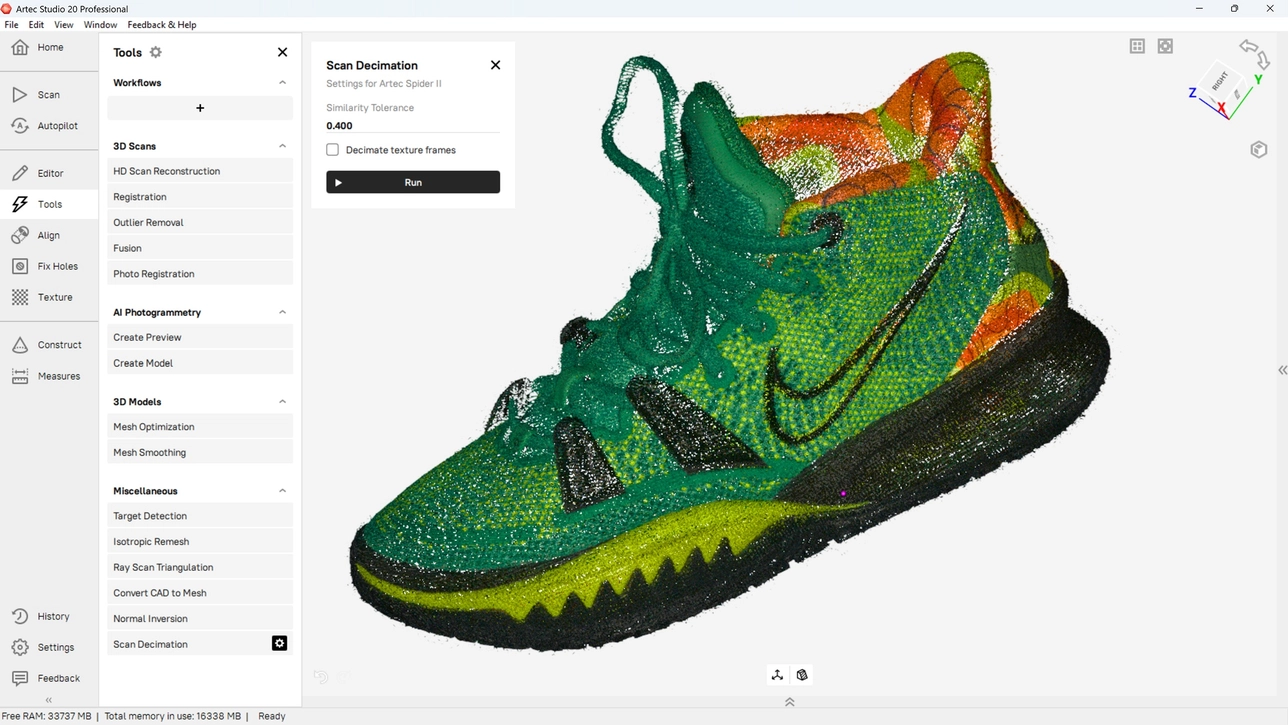
Upgrade for access to breakthrough features like Live Scan Decimation, Autopilot, and Variable Gain, which optimize and streamline Spider II 3D scanning.
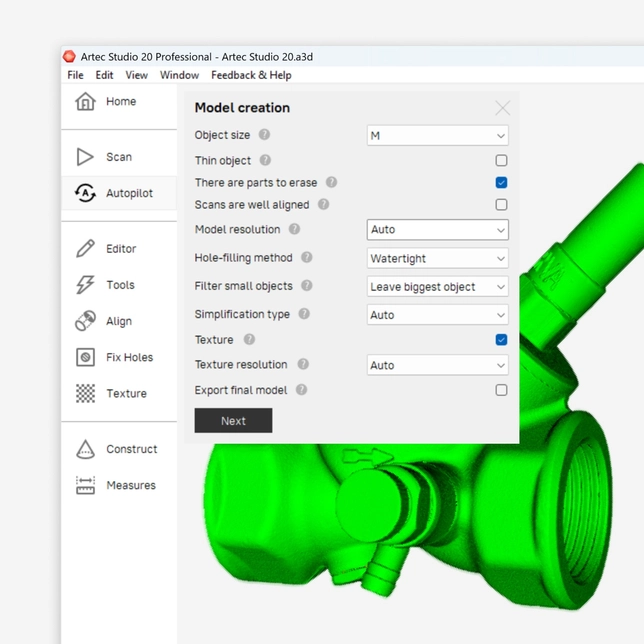
Streamline with Spider II Autopilot
Autopilot has long benefited new Artec Studio users by taking over complex data processing tasks on their behalf. Now Spider II owners can benefit from the same accessibility.
Real-time Fusion for all
All Artec’s handheld, target-free 3D scanners are now turbocharged by Real-time Fusion, which generates dynamic, highly detailed previews for reliable results.
Reduced noise
Thanks to enhancements inside Artec Studio, Spider II now captures less noisy scan data, so you can spend less time in post-processing.
Variable Gain
Achieve the best possible results when capturing tricky-to-scan surfaces without having to dive into the settings and tinker with gain parameters.
Live Scan Decimation
Filtering out unneeded frames with live scan decimation makes life easier for users, allowing for faster data processing and easier export to third-party software.
Capture ultra-high resolution, full-coverage scans with Micro II
HD Mode for Micro II allows for even more detailed 3D scans, while 3-axis support makes it easier to capture intricate geometries in full.
Three-axis support
Achieve full-coverage scans that include areas not visible in the past, including undercuts & complex geometries, using its newly supported third axis.
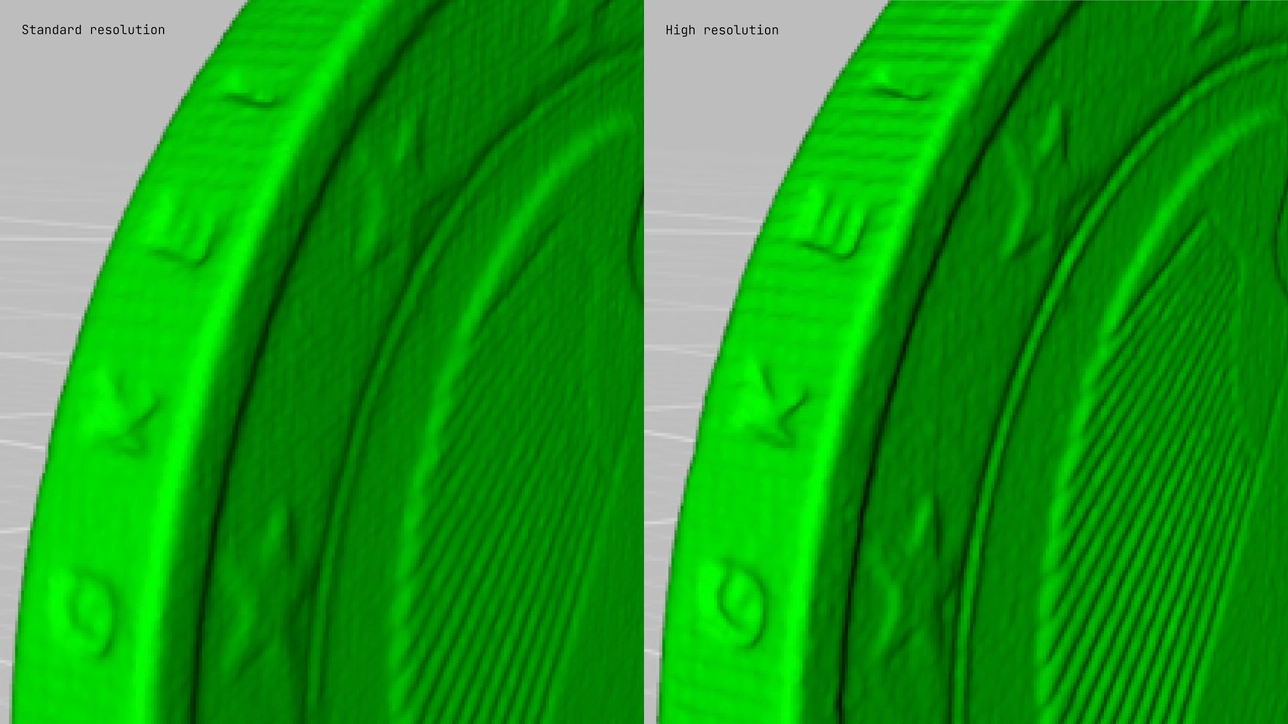
Micro II gets HD Mode
Activate Micro II’s new HD Mode to boost the number of points captured per frame for improved fine details, sharp edge capture, and overall resolution.
Improved visuals, better scans with Artec Point
Enhanced visualization allows you to pick up more detail with every scan, so each capture session is more intuitive and at least 2x faster.
Next-level photogrammetry, powered by AI
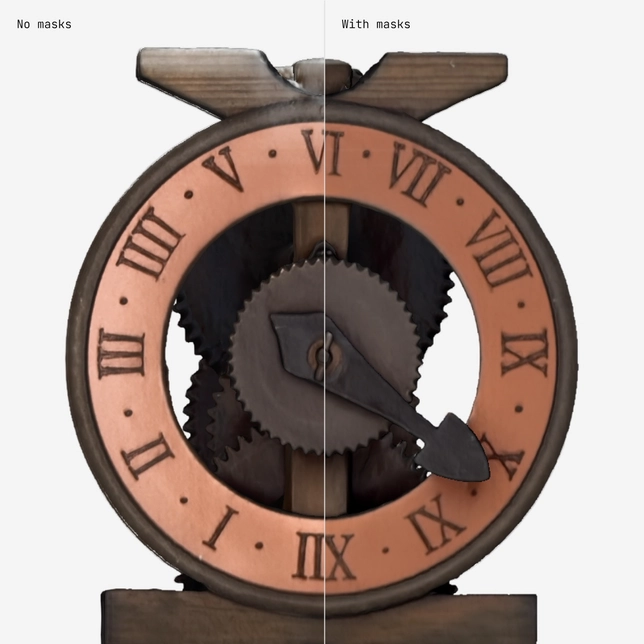
Refined masking mode
Artec Studio’s new mask-correcting mode allows you to capture artifact-free, realistic 3D models – even in busy real-world environments.
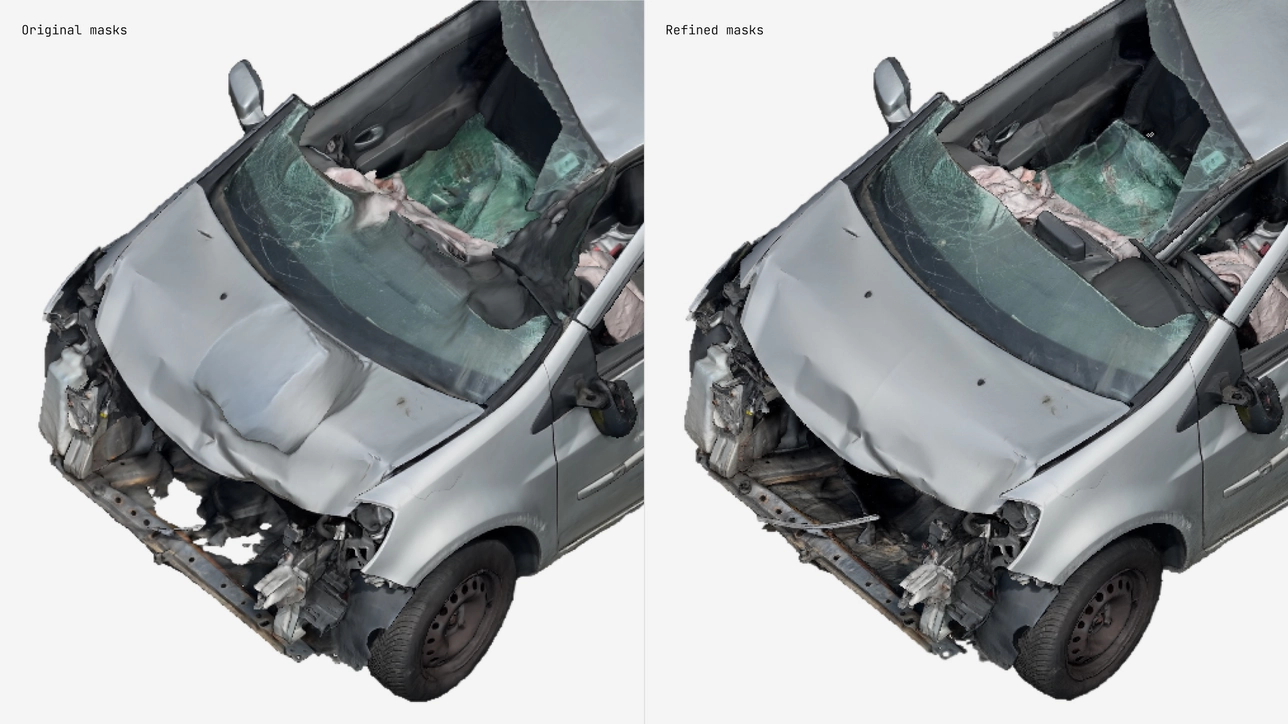
Use masking for texturing
Filter out surrounding textures, preventing them from blending in and spoiling your photogrammetry model’s appearance.
Multi-camera support
Build 3D models using data captured with multiple devices for more complete reconstruction in a fraction of the time.
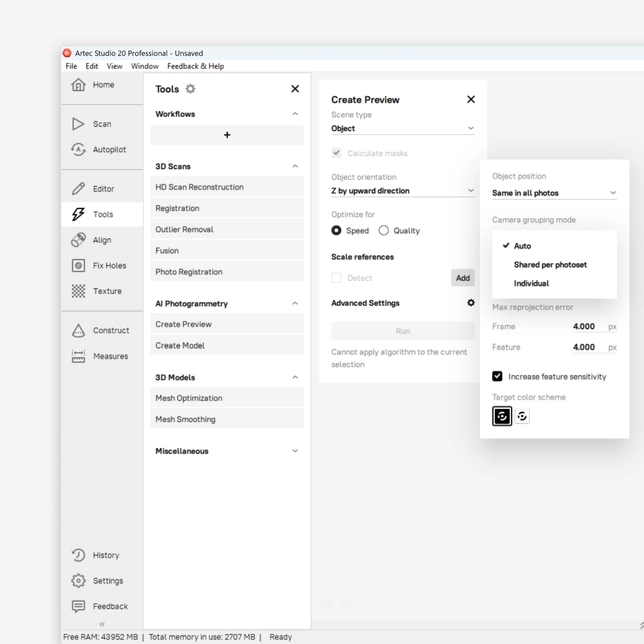
Sharp image prioritization
Create digital twins using only the best photos or video stills for the most realistic possible results.

Further integration for best-in-class results
Artec Studio is now a more complete offering with broader support for popular file formats like USD & RCP and third-party software such as Zeiss Inspect.
Compare Artec Studio
Artec Studio version |
20 |
19 |
18 |
|---|---|---|---|
Fast, powerful 3D processing |
|||
Multi-scanner pipeline: |
|||
NEW: Workflows: |
|||
Multi-scanner Smart Fusion |
Improved UI for multi-preset fusion | Fine-tunning of scanner-specific data | |
Multi-scanner Global Registration |
|||
Fusion: speed |
10% faster and with 30% less RAM | ||
Fusion: exclude faulty frames |
|||
Global registration |
New option: thin objects | 2X faster | |
Single-step mesh optimization |
10X faster | ||
Scan decimation |
|||
Autopilot |
Including Spider II | Including Micro II | |
NEW: Spider II Real-time Fusion support |
|||
NEW: Micro II three-axis support |
|||
Ray II ‘Street View’ mode |
|||
Artec Point compatibility |
|||
X-Ray Mode |
|||
HDR & 16-bit Texturing |
|||
AI-powered HD Mode |
|||
HD Mode for Leo and Eva |
4X faster | ||
NEW: HD Mode for Micro II |
|||
Point density and frame frequency selection |
Automatic or manual | Automatic or manual | Automatic or manual |
Simple HD presets |
|||
Multiple HD reconstructions with different settings |
|||
Setting optimizer based on your GPU |
|||
AI Photogrammetry |
|||
Create 3D models directly from photos and videos with AI |
|||
Advanced CGI tools for the perfect color 3D model |
|||
AI color contrast enhancer for Leo |
|||
Boosted 3D scan texture quality |
|||
NEW: Improved photogrammetry texture |
|||
Optimized color capturing mode for Leo |
|||
Scene lighting optimization |
|||
Auto glare removal |
|||
Model-to-model texture transfer |
|||
Photo-texture |
Workflow automation support | Ray II photo-texture available | Includes photo-viewing mode |
Texture healing brush |
|||
Defeature brush |
Improved | ||
Smart automation |
|||
Autopilot |
|||
Auto-align |
|||
Scan size optimizer |
|||
Smart base removal |
|||
Easy 3D scanning |
|||
Auto-brightness |
|||
Automated sensitivity for scanning black, shiny, and fine objects |
|||
Create a 3D model from a combination of Artec 3D scanners |
|||
Texture and geometry scanning |
|||
Quality inspection |
|||
PtB certification of Artec Studio |
|||
Mesh-to-CAD comparison |
Import SAT, STEP, IGES, X_T files | Import SAT, STEP, IGES, X_T files | Import SAT, STEP, IGES, X_T files |
Mesh-to-CAD alignment |
Automatic | Automatic | Automatic |
Datum alignment |
|||
2D section analysis |
|||
Automatic defect detection |
|||
Deviation mapping |
Advanced distance calculation | Advanced distance calculation | Advanced distance calculation |
Thickness mapping |
|||
Tolerance Check Mode |
|||
Enhanced target support |
|||
Target thickness compensation |
|||
Surface distance maps: one-click annotations |
|||
Surface distance maps: point-by-point deviation |
|||
Measurements: linear, geodesic, sections, distance maps, volume, annotations. Export to CSV, DXF, XML |
|||
Direct export to Control X |
|||
Run Control X Inspection from Artec Studio |
|||
Run Control X Batch Inspection from Artec Studio |
|||
NEW: Run ZEISS Optical 3D Inspection from Artec Studio |
Scan-to-CAD for reverse engineering |
||
Fit CAD primitives to 3D model |
Cylinder, sphere, cone, plane, torus | Cylinder, sphere, cone, plane, torus | Cylinder, sphere, cone, plane, torus |
Create free primitives |
Cylinder, sphere, cone, plane, torus, box | Cylinder, sphere, cone, plane, torus, box | Cylinder, sphere, cone, plane, torus, box |
Autosurfacing |
Improved | ||
Freeform fitting |
|||
Boolean operations |
|||
Geometrical constraints |
|||
Precise positioning |
|||
Export multiple open and closed contours directly to CAD |
|||
Create draft angles |
|||
Chamfer and fillet tools |
|||
Instant deviation analysis |
|||
Move and offset faces |
|||
Surface thickening tools |
|||
Direct export of fitted primitives and meshes to SOLIDWORKS |
|||
Direct export to Design X |
|||
Disassembly of assemblies |
|||
Delete faces |
|||
UI and ergonomics |
|||
Home screen project manager |
|||
Quick panel |
|||
In-depth properties tab |
Advanced | Advanced | Advanced |
Manual frame picking |
|||
Multiple object export |
|||
Customizable workspace |
|||
Cloud collaboration |
|||
Artec Studio to Artec Cloud Project Synchronization |
|||
Artec Cloud integration |
|||
One-click 3D model share |
Enough Talk Let’s Build Something Together
Industries
Artec Portable 3D Scanners are used in streamlining, developing, and customizing a wide range of industries.

Product design

Customisation

3D documentation

Quality Control

Rapid Prototyping

Aerospace

Orthopedics

Orthotics & Prosthetics

Plastic Surgery

Custom Wheelchairs

Research

Training

Online Museums

Forensics

Heritage Preservation

Architecture

CGI

Fashion
© 2024 ALTEM TECHNOLOGIES PVT. LTD.
Engineering Phygital Transformation
© 2024 ALTEM TECHNOLOGIES PVT. LTD.